
Version 7.3 of Apogee StoreFront, ECO3’s web-to-print solution, will be released on September 26, 2026. This version focuses on last-minute content replacement in orders as well as more flexible and secure email communication.
Upload or replace artwork for an order item in the cart
With uploadable products, shoppers can add such products to a cart before the content or artwork is even available. This can be handy for costing, since a company may want to know the total cost of all print orders before creating the posters and signage. It is also useful for complex orders that take time to set up but for which the content arrives at the very last minute. The shopper can add a product with its options set to the cart without uploading any artwork. Apogee StoreFront will automatically use a blank placeholder for this item. Once the artwork is available, the shopper can open the cart, use the new 'Replace' link to replace the blank placeholder with the actual design and then submit the order.

This 'late upload' or 'replace' function can also be used for reorders. A shopper who orders the same printed newsletters each week can reorder last week's order, 'Replace' the artwork and submit the new order with just a few clicks.
The same 'Replace' function also lets a buyer who spots a mistake in an uploaded file fix it with a new upload, instead of starting the ordering process all over again. Please note that it does not work for multidoc orders and the original 'bound flow'.
Send e-mail from your own mail server
StoreFront sends a great deal of mail on behalf of its users: order confirmations, approval requests, shipping notifications, password resets, etc.
Mail services nowadays verify that a sender is entitled to use the domain it claims. Messages that fail this check are rejected rather than delivered. Due to these more strict authentication requirements, the mail service in StoreFront v7.3 got a major update.
StoreFront v7.3 now sends all mail using these settings:
- The sender is noreply@apogeestorefront.com
- The name of the sender is the name the admin configured in
- the Store > General tab for emails related to orders in that store
- the Advanced › Production Center tab for all account level mails.
- The reply-to email address is the email address the admin configured in
- the Store > General tab for emails related to orders in that store
- the Advanced › Production Center tab for all account level mails.name of the sender is the name the admin configured in
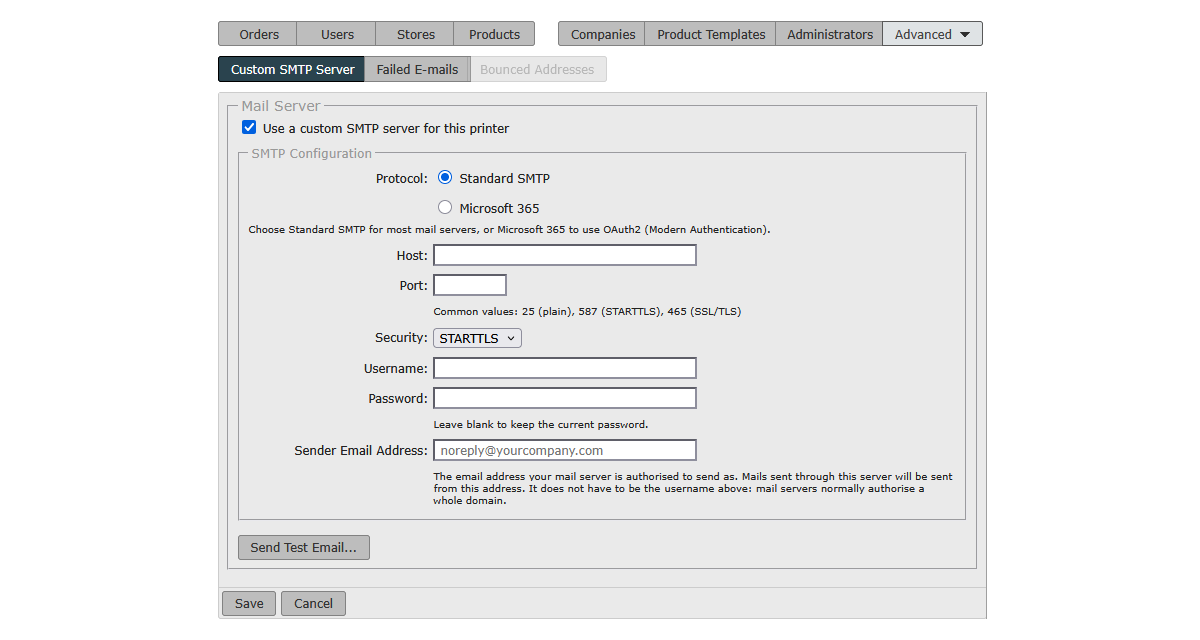
Version 7.3 also optionally allows you to route all mail through your own mail server, so that it reaches your customers from your own domain. This was frequently requested by users. The settings to use your own server can be found in StoreCenter under Advanced › E-mail. As shown below, you can use your own mail service or the one from Microsoft 365.
Do not show older orders to company admins
In the Advanced section of Stores > General, you can choose to show buyers only their most recent orders. This setting helps meet data retention obligations. Until this release, the selected limit applied to store users only, so company administrators and approvers still saw the full order history. In version 7.3, the limit applies to company administrators and approvers as well, and the counters on the StoreCenter dashboard respect it too.

Internal changes
A number of the underlying components and third-party libraries that StoreFront and StoreCenter are built on have been upgraded to improve security and reliability. These updates require no changes by users and cause no visible difference in day-to-day use.